


Cursor Camp - Hang Out as a Tiny Arrow in the Browser
Play Cursor Camp instantly in your browser - No download required!
Share Cursor Camp with Friends!
Tweet about Cursor Camp, a fun Casual game!
Discover More Cursor Camp
Sprunki Ketchup Royal & Friends
Sprunked Feel Sprunki
Dinosaur Game
Sprunki Retake: Space Balls
Sprunki Pokemon As Ice
Sprunki Sprank
Sprunki Phase 3 Remastered
Sprunki Dumpling
Sprunki But Normal 2.0
Sprunki Parodybox
Sprunked Sprunked
Sprunki Phase 999
Ninjamuffin

Archery World Tour
Sprunki Sprunji
Sprunki PAC-MAN Edition
Sprunki Interactive Tunner
Sprunki Fase 3
Sprunki Sprunkr 2.0

Sprunked Redesign
What Even Is Cursor Camp
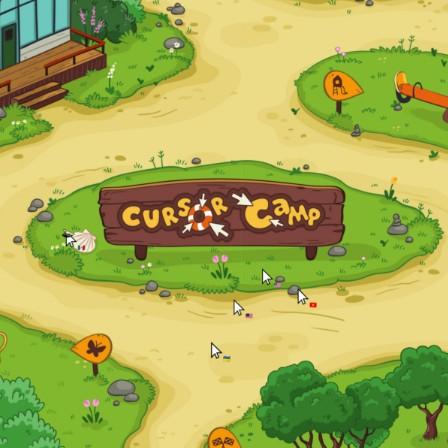
Cursor Camp is a chill browser hangout where nobody has a fancy avatar or skin. You walk around as a plain little cursor, same as the one you click with right now, and that weird minimalism is kind of the whole charm. Toss in arcade battles, goofy mini games, and random campers wandering around, and you've got something weirdly addictive.
How to Play Cursor Camp
Pick Up and Move Your Cursor
Loading the page drops your cursor straight into the camp. Just glide your mouse around to walk, no WASD tutorials, no menus to memorize.
Find Mini Games Around Camp
The map scatters small arcade spots where you can jump into quick battles with other cursors. Walk into one and you're in, no extra window.
Battle Other Cursors
Click to interact, dodge, and chase opponents depending on the mini game. Winning tracks on a little leaderboard so you can flex.
Chill in the Lobby
Plenty of folks just wander around, scribble on shared boards, and spam emotes. You can absolutely ignore the games and just vibe.
Use Emotes and Chat Bubbles
Pop a speech bubble or a tiny emote above your cursor to react. It's how strangers go from awkward to friends in about ten seconds.
Cursor Camp Questions, Answered
Is Cursor Camp actually free?
Yep, fully free in the browser. No premium currency, no energy meters, no pay-to-skip nonsense.
Do I need to make an account?
Nope. You can waltz in as a cursor with zero sign up. Bookmark it if you want it to stick around.
What do I actually do in the game?
Wander the camp, join arcade battles, scribble, chat, and try to be the cursor with the best bragging rights.
Are there multiplayer battles?
Yes, the arcade modes throw your cursor against other real players in quick rounds. Lobbies fill up fast.
Can I play on a laptop or tablet?
Anything with a mouse or trackpad works great. Touch screens are workable, but a real cursor glides easier.
Is Cursor Camp safe for younger players?
It's usually chill, but the chat is open with strangers, so keep an eye on younger kids like any browser chat.
Why is my character just an arrow?
That's the gimmick. Everyone looks the same on purpose, so the focus stays on the game instead of your drip.
Does the game save my progress?
Light stuff like leaderboard scores sticks around per session. It's more about right-now fun than long campaigns.
Can I play with friends?
Yes, send them the link and meet up inside camp. Same page, same lobby, immediate cursor reunion.
Does it work on school Chromebooks?
Most unblocked browser versions run fine on standard Chromebooks since it's lightweight and doesn't need anything fancy.
Are there emotes or customization?
Cursor colors and chat bubbles let you stand out a tiny bit. More than enough to spot your friend in a crowd of arrows.
Reasons to Boot Up Cursor Camp
You Already Know the Controls
If you can move a mouse, you can play. There is literally zero learning curve to entry, which feels amazing.
Zero Pressure Hangout
No quests screaming at you, no time gates. Just open the tab and decompress between study sessions or work blocks.
Arcade Battles That Pop Off
When you want competition, the mini games get properly spicy with real players and fast rounds.
Easy Mode Socializing
Talking through a tiny cursor bubble feels low stakes. Great for shy gamers who hate voice chat.
Instant Boot, No Drama
No 40 GB download, no loading screens with lore you skipped. Click and you're in camp within seconds.
Jump Straight In
Cursor Camp runs straight from your browser tab, no installer, no .exe, no permission popups. Click play, move your mouse, and you're already camping with strangers. Close the tab when you're done and zero traces are left behind.
Why Cursor Camp Hits Different
Zero Avatar Energy
No skins, no gacha, no loadout screen. Every player looks identical as a cursor, so the playing field feels genuinely equal.
Instant Browser Load
Click the link and you're camping in under five seconds. No download, no installer, no "one more update please".
Arcade Battles on Tap
Small round-based fights pop up where you least expect them. Quick to learn, surprisingly hard to put down mid-tournament.
Social Without the Awkward
Chat bubbles and cursor reactions make talking to strangers feel low effort. You can mute, drop a 👍, or get roasted in three clicks flat.
Suspiciously Clean Vibes
Minimal art, soft background music, and tiny animations. It's oddly calming, even during a heated battle round.
Cursor Camp Hacks for New Players
First Move
When you spawn, click on a nearby camper to wave. It starts almost every chat with a smiley reaction and gets you out of the silent zone fast.
💡 Drop a wave right after loading in to break the ice.
Battle Strategy
Arcade rounds reward quick clicking and clean dodges. Don't tunnel vision on one opponent, because flanking cursors love sneaking in from the sides.
💡 Keep your cursor moving in small circles during fights.
Map Awareness
Sweep your cursor around corners before walking into a battle zone. A lot of mini games are clustered, so neighboring lobbies often have weaker players to farm.
💡 Scope out two or three arenas before picking one.
Social Game
Sticking near the bulletin board spot attracts chatty players who'll queue with you for games. It's the easiest way to build a small crew.
💡 Hang at the board for a minute before queuing up.